What Is Base64 Encoding and How to Use It
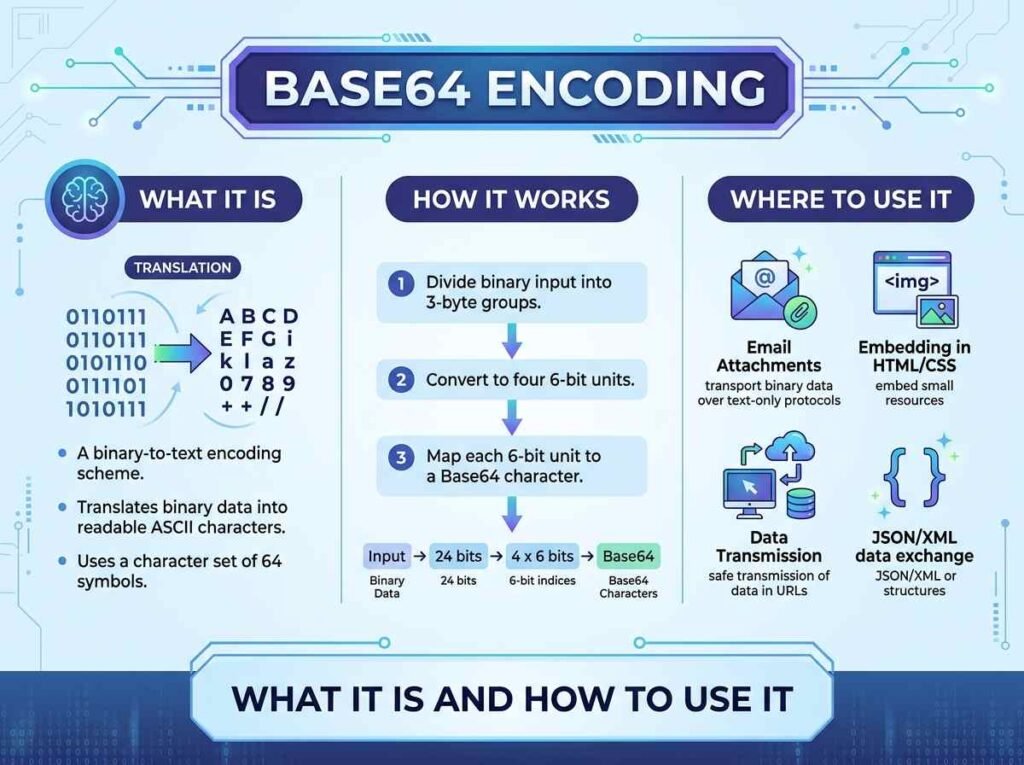
Base64 encoding is a way of turning data into a safe set of text characters that can travel through systems built only for plain text. Developers run into it constantly — in data URIs, email attachments, API tokens, and config files. Understanding what Base64 is, and what it is not, helps you use it correctly and avoid a common security mistake.
This guide explains how Base64 encoding works, when to use it, and how to encode or decode anything in seconds.
What Base64 Encoding Is
Base64 takes data, including binary data like images, and represents it using 64 safe characters: the letters A to Z in both cases, the digits 0 to 9, and two symbols. The result is a longer string made entirely of characters that survive systems which might otherwise corrupt raw binary.
The trade-off is size. Because it represents data with a limited character set, Base64 output is roughly a third larger than the original. That is the price of making the data safe to transport as text.
How Base64 Encoding Works
Under the hood, Base64 groups the input into chunks and maps each chunk to one of its 64 characters. You do not need to do this by hand — the point is simply to understand that encoding is a reversible transformation. Anything you encode can be decoded back to exactly what it was.
This reversibility is the key fact to remember. Base64 is encoding, not encryption. It scrambles the appearance of data but provides no security, because anyone can decode it just as easily as you encoded it.
When Developers Use Base64
Base64 shows up in several everyday situations:
- Data URIs — embedding a small image or font directly in CSS or HTML as text.
- API tokens — many tokens are Base64 encoded, so decoding reveals the structure inside.
- Email attachments — the email system encodes binary files as Base64 to send them safely.
- JSON payloads — including binary data in a text-only format like JSON.
In each case, the goal is the same: move data that is not plain text through a channel that only handles text.
How to Encode and Decode Base64
The simplest way to work with Base64 is a Base64 encoder and decoder. Paste your text, choose encode or decode, and the result appears instantly with full Unicode support, so emojis and accented characters convert correctly.
The steps are straightforward:
- Paste your text or Base64 string into the input.
- Click encode to convert text to Base64, or decode to reverse it.
- Copy the result.
Because the tool runs in your browser, you can safely decode tokens and strings without sending them to any server.
The Security Mistake to Avoid
The most common error is treating Base64 as if it hides or protects data. It does neither. A Base64 string looks scrambled, but decoding it takes one click, so it offers no real protection.
Never use Base64 to store passwords or secrets thinking they are safe. If you need to protect data, use proper encryption. Base64 is purely for safe transport of data through text-based systems, and using it for security is a mistake that has exposed sensitive information in real projects.
Base64 and Data URIs in Practice
One of the most common places developers meet Base64 is the data URI. Instead of linking to a small image file, you can embed the image directly in your CSS or HTML as a Base64 string. This saves a separate network request, which can speed up the first paint of a page for tiny assets like icons.
There is a balance to strike, though. Because Base64 makes data about a third larger, embedding big images bloats your files and can slow things down rather than speed them up. The rule of thumb is to embed only small assets and keep larger images as normal linked files. Used that way, Base64 data URIs are a handy performance tool rather than a liability.
Frequently Asked Questions
Is Base64 encryption?
No. Base64 is reversible encoding, not encryption. Anyone can decode it instantly, so it provides no security and should never protect secrets.
Why is Base64 output larger than the original?
Because it represents data using a limited set of safe characters, the encoded result is about a third larger than the original input.
Does Base64 support emojis and special characters?
Yes, when the tool is Unicode-aware. A UTF-8 safe encoder handles emojis and accented characters correctly in both directions.
Is it safe to decode tokens online?
Only with a browser-based tool. One that processes everything locally never uploads your input, so decoding stays private.
Encode or Decode in Seconds
Base64 is simple once you remember it is for transport, not protection. To convert anything instantly, open the Base64 encoder and decoder and paste your text. For more utilities that speed up your workflow, read our guide to the best free online tools for developers.